Key Information at a Glance
In this section, you’ll find answers to the most important questions about the My HCOB Portal.
General
The My HCOB Portal supports German and English. The language is automatically detected based on your individual browser settings.
Within the portal, you can also change the language at any time under “Settings”.
To activate your HCOB Token, you will need your Portal ID. You can find it after logging into the My HCOB Portal under “Settings”.
Note: The User ID corresponds to the Portal ID that you use during the activation process.
To apply for access to the My HCOB Portal, please contact your Relationship Manager.
If you are a new customer, please use the following link: Arrange a consultation.
You can customise your dashboard to meet your individual requirements. For more information, please refer to the Widgets Quick Guide.
To use the My HCOB Portal, you need a current web browser. The latest versions of Microsoft Edge, Mozilla Firefox, Google Chrome and Safari are supported.
HCOB Token
No, the HCOB Token is linked to a single device after activation and cannot be used on multiple devices.
Therefore, it cannot be used on multiple devices at the same time.
You can find the HCOB Token in the App Store by using the provided QR codes. Simply scan the relevant QR code with your mobile device to access the app directly.
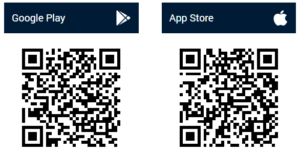
Yes, the HCOB Token can also be used on tablets. The app can be installed and used on compatible devices.
In the event of loss, theft, or suspected misuse of your mobile device, please inform us immediately so that a block (suspension) can be initiated.
You can reach us 24/7 at +49 40 3333-23400.
The HCOB Token does not store biometric data itself but uses your device’s security features. After major operating system updates, the existing connection to the app may be reset, which means you will be asked to enter the password you defined during setup again.
You can then re-enable biometric authentication in the My HCOB Portal app under “Settings”.
Electronic Banking
Yes, the Electronic Banking in the My HCOB Portal is multibank-capable and supports the integration of accounts held with third-party institutions. This requires you to be registered and activated for EBICS with the respective third-party institution.
Please note that a system-related technical participant must also be commissioned with the third-party institution.
A payment order may be rejected, for example, due to missing approvals, incorrect information, or insufficient permissions.
For suitable menu entries, a star symbol is displayed, which you can use to add the respective item to your “Favourites”.
Yes, when manually creating a credit transfer or direct debit, you can save the details of beneficiaries and debtors. To do this, select the “Save in address book” checkbox displayed when entering the relevant details.
For future manual entries, you can select the saved party, including the associated account details, directly from the address book.
Technical hotline from within Germany
0800 3273001 (free of charge)
Monday to Friday 8:00 am to 5:30 pm,
except on public holidays and 24 and 31 December.
Technical hotline from abroad
+49 40 3333-23420
Monday to Friday 8:00 am to 5:30 pm,
except on public holidays and 24 and 31 December.
Blocking electronic banking access
+49 40 3333-23400
Around the clock.
Please do not hesitate to contact us if you have any questions or require further information.
The My HCOB Portal brings together all relevant services – including payment transactions – in a secure environment, available anytime and anywhere.